
Truple - Online Accountability
TrupleParenting
4.4406.00 Reviews
- Version
- 2.9.8
- Installs
- 50.00K
- Age Rating
- Everyone
Screenshots
Our Review of Truple - Online Accountability
 Analysis by Appyee
I would decide whether Truple - Online Accountability is right for you by starting with one question: do you want help changing your own online habits, or do you need a parent-focused way to guide a child’s device use? Truple sits between those needs. It is a parenting app from Truple, but its accountability approach can also suit adults who have chosen to share their online activity with someone they trust.
That distinction matters. An accountability arrangement works best when everyone understands what is being shared and why. If you are looking for a private, self-guided focus timer, or for a full device-management setup with a parent controlling a child’s phone, this may not match your expectations. I would choose it when shared awareness is the point, and discuss the boundaries before turning monitoring into part of a family routine.
Choose the kind of support you actually need
Before installing it, I would agree on the practical details with the person who will receive or review activity: what the goal is, who sees information, and how you will talk about it. For a teen, that conversation can make the difference between a tool that supports trust and one that feels like surveillance. For an adult accountability partner, it helps keep the arrangement specific rather than vague.
A useful starting point is one clearly defined behavior, such as reducing aimless browsing during homework or keeping a work session focused. A broad promise to “use the internet better” is hard to assess and can make monitoring feel intrusive without giving anyone a clear next step. I’d treat the app as a prompt for a conversation, not as a substitute for one.
How it fits among parenting and focus tools
Many families begin with built-in screen-time controls or content filters. Those tools can be a better fit when the main need is setting device limits or restricting access. A focus app may suit someone who wants private reminders and personal tracking instead. Truple’s distinctive angle is accountability through sharing activity with a trusted person, so it is most relevant when another person’s awareness is part of the plan.
That difference also sets a limit. Shared monitoring can make a goal feel more concrete, but it does not automatically teach a child how to make good choices online, nor does it resolve disagreements about what should be allowed. I would pair it with age-appropriate conversations and clear expectations. If the family’s priority is simply to block categories of content or schedule device use, a dedicated parental-control option may be a more direct match.
A realistic routine, not a constant inspection
Imagine a student who keeps drifting from homework into unrelated browsing. A parent and child could agree that the purpose of using Truple is to notice patterns and check in, rather than to comment on every captured moment. They might review what is useful at a planned time, then adjust the goal if the routine is not working. That is a more constructive use than treating every alert or screenshot as evidence of wrongdoing.
I would also avoid setting an accountability schedule that is more intense than the situation calls for. Regular screenshots may be useful to some people, but they can feel uncomfortable if the user did not understand the arrangement or cannot predict how it will be handled. Start with a purpose both sides accept, explain who receives shared material, and revisit the arrangement if it creates more anxiety than progress.
Small choices that make the setup more useful
One non-obvious advantage of a shared approach is that it can expose a mismatch between intention and routine: someone may think they are checking a site briefly, while repeated visits interrupt the task they meant to finish. I would use that observation to adjust the environment or agree on a specific check-in, rather than turning a report into a score or a source of shame.
It also helps to decide in advance what happens when a goal is missed. A calm conversation about what got in the way is more useful than an automatic punishment, especially with children. For adults, the same principle applies: an accountability partner should help clarify the next step, not become a manager of every online decision. The app can make activity visible, but the people using it still have to decide what that visibility means.
Another practical trade-off is the balance between useful oversight and personal space. Families may need different boundaries for a younger child and an older teenager, while adult users may prefer a limited, voluntary arrangement. I would check the sharing settings together and make sure the person being monitored knows how to stop sharing. That keeps consent and expectations part of the routine instead of leaving them as an awkward conversation later.
What to weigh before committing
Truple is free to install, with in-app purchases ranging from $4.99 to $159.99 per item, so I would check the available purchase details before relying on a particular setup. It is rated for Everyone and has an average rating of 4.5 from 894 ratings, with 50K+ installs. Version 2.8.9 lists Android 7.0 as the minimum operating-system requirement. Those figures offer context, but they do not tell you whether its shared-accountability model suits your household; that depends on the goal and the people involved.
If you are moving from another tool, the main cost is likely to be the change in routine rather than the installation itself. You will need to explain the new boundaries, decide who is responsible for reviewing shared activity, and avoid overlapping systems that create confusing or repetitive oversight. I would make one change at a time, then ask whether the arrangement is helping the intended behavior. If the answer is no, changing the goal or choosing a less share-based tool may be better than adding more monitoring.
Ever stumbled across an app that just makes you go, "Wow, I didn’t know I needed this until now!"? That was exactly my reaction when I tried out Truple - Online Accountability. This app is like having a digital friend who’s always got your back. Let me walk you through my experience with it.
What Exactly is Truple?
So, what’s the big deal about Truple? At its core, it’s an accountability app designed to help you stay on track with your online activities. Think of it as a gentle nudge to keep you focused and responsible, especially when the internet is full of distractions. It’s a tool for anyone who feels they could use a bit of discipline online.
Getting Started
Setting up the app was a breeze. I appreciated the straightforward installation process on both Android and iOS. You just download it, create an account, and you’re good to go. The interface is sleek and intuitive, which makes navigation a piece of cake.
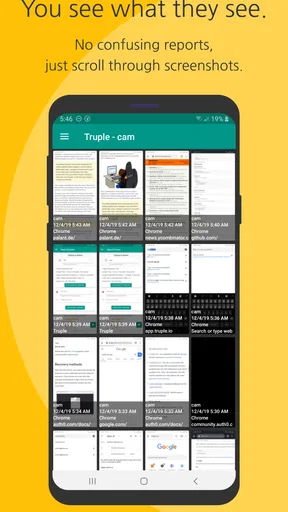
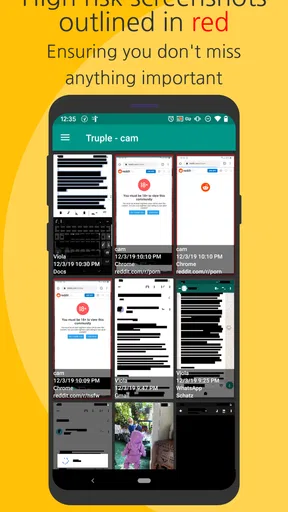
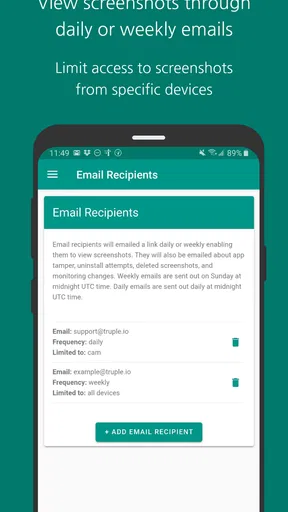
Once you’re in, you’ll notice the app offers some cool features like regular screenshots of your device. These are sent to a trusted partner, like a friend or family member, to help you stay accountable. It might sound a bit invasive at first, but don’t worry, the app lets you customize how often these screenshots are taken and who receives them.
Features That Stand Out
One of the features I found super handy is the ability to set personalized goals. Whether it’s limiting your time on social media or avoiding certain websites altogether, Truple lets you tailor the experience to suit your needs. It’s like having a digital coach cheering you on.
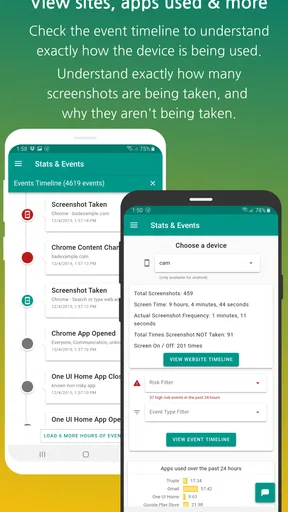
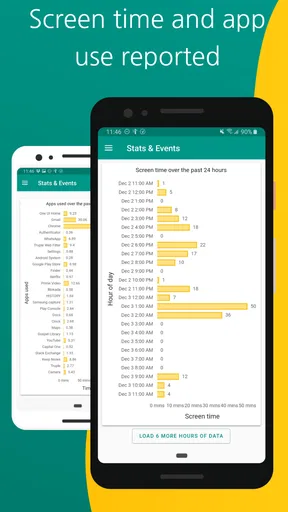
Another cool aspect is the real-time alerts. If you’re straying from your goals, the app gives you a gentle reminder. It's like that friend who nudges you when you’re about to make a choice you’ll regret. Plus, the app's reports provide insights into your browsing habits, which can be eye-opening!
Privacy and Security
I know what you’re thinking: sending screenshots sounds a bit sketchy, right? But Truple takes privacy seriously. All data is encrypted, and you have full control over what’s shared and with whom. Plus, you can stop sharing anytime you want, which makes it feel more secure.
Why You Might Love It
For anyone looking to improve their online habits or just needing a bit of extra motivation, Truple is a game-changer. It’s perfect for students, professionals, or anyone who finds themselves getting lost in the endless scroll. The accountability aspect can really help you stay focused on what truly matters.
And if you’re a parent, this app offers a unique way to monitor and guide your kids’ online behavior without being too intrusive. It’s more about guiding and less about policing, which is a nice balance.
Wrapping It Up
In a world where digital distractions are everywhere, having a tool like Truple can be incredibly beneficial. It’s not just about staying accountable; it’s about building better habits and making the most of your time online. If you’re looking for a way to enhance your productivity and stay on track, this app is definitely worth a shot.
So, there you have it! That’s my take on Truple - Online Accountability. If you’re intrigued, why not give it a try? You might just find it’s the app you didn’t know you needed.
My recommendation
I would recommend this approach to a parent and child who are willing to agree on the purpose of sharing and review it together, or to an adult who actively wants a trusted person involved in their online goals. The app’s parenting focus makes that family use feel natural, while its accountability model can also make sense for personal habits when both people opt in.
I would skip it if you mainly want quiet, private self-management, or if monitoring is likely to worsen conflict at home. In those situations, built-in device controls, a content-filtering tool, or a simple focus method may be a better starting point. My main advice is to choose Truple for the conversation and shared responsibility it can support—not because screenshots alone can solve a problem.
Verdict
Strengths of Truple - Online Accountability
- User-friendly interface for easy navigation.
- Real-time monitoring of device usage.
- Customizable alerts and reports.
- Cross-platform support for Android and iOS.
- Strong focus on privacy and security.
Limitations of Truple - Online Accountability
- Requires constant internet connection.
- Limited free features available.
- Can drain battery life quickly.
- May feel intrusive to some users.
- Subscription required for full access.
Similar Picks in This Category
View All
Family Space
Motorola Mobility LLC.3.9

شرطة الأطفال - مكالمة وهمية
Oub Apps4.1

Findmykids: Parental Control
LETEM LTD4.6

Pregnancy + | Tracker App
Philips Electronics UK Limited4.8

Policía de niños - para padres
Kids police4.7

Pregnancy App
Amila4.9
Frequently Asked Questions
What is Truple and how does it work?
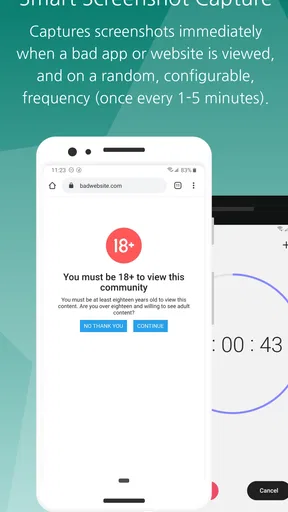
Truple is an accountability app designed to help users maintain integrity online by capturing and sharing random screenshots of their device activity. These screenshots are sent to a trusted accountability partner, ensuring transparency and promoting responsible usage. The app runs discreetly in the background, providing peace of mind without disrupting regular device use.
Is Truple compatible with all devices and operating systems?
Truple is primarily designed for Android devices, but it also offers compatibility with Windows and MacOS through additional setup steps. While the app is not natively available for iOS due to its strict privacy policies, alternative accountability solutions are suggested for Apple users on Truple's website.
How does Truple ensure user privacy and data security?
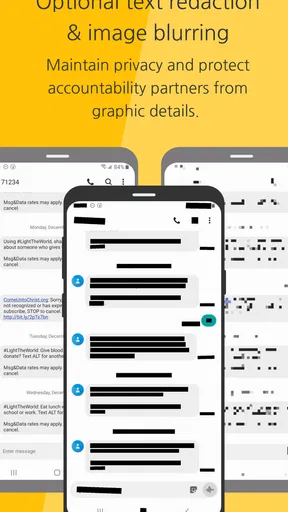
Truple prioritizes user privacy by employing end-to-end encryption for all data transmitted between the user's device and their accountability partner. Screenshots are stored securely and can only be accessed by the designated partner. The app provides options to customize which apps are monitored, ensuring sensitive information is protected.
Can Truple be customized to fit individual needs?
Yes, Truple offers various customization options. Users can adjust the frequency of screenshots, select specific apps to monitor, and designate multiple accountability partners. These features allow users to tailor the app according to their unique requirements, ensuring a balance between accountability and privacy.
What are the subscription options and costs associated with Truple?
Truple offers a flexible subscription model with monthly and yearly plans. The cost varies depending on the number of devices and users. There is also a free trial available for new users to explore the app's features before committing. Detailed pricing information can be found on Truple's official website.
